

批量匯入禮品卡至 Shopify
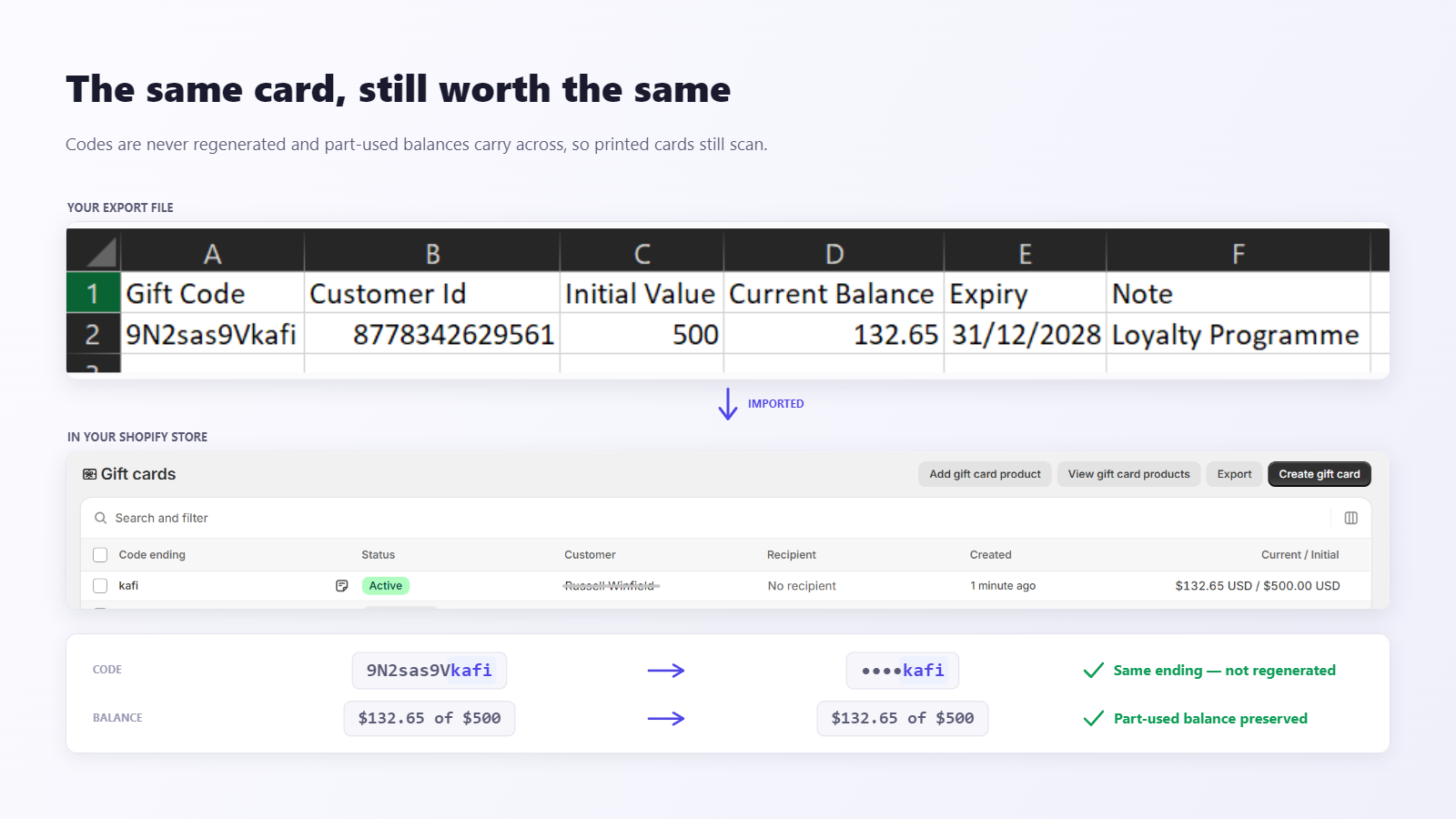
從 CSV、Excel 或 TSV 匯出檔把現有禮品卡遷移到 Shopify。每張卡保留原始卡號,顧客手上已有的卡在結帳時照常可用,部分使用過的卡也會依實際剩餘餘額重建。
Shopify Gift Card Importer 能做什麼
BluePeacock Gift Card Importer 是一款遷移工具,協助 Shopify 商家把禮品卡從其他平台移轉過來。每張卡都保留原始卡號,所以遷移前印好的卡在結帳時仍可掃描使用;部分使用過的卡會依準確的剩餘餘額重新建立,不會被重設為面額。到期日、內部備註和顧客指派也會一併帶過來。Shopify 禮品卡一經建立便無法刪除,因此在寫入您的商店之前,每一列都會先經過檢查,而且可以編輯。
- 保留原始卡號
- 精確的剩餘餘額
- 支援 CSV、Excel、TSV 和 TXT
- 匯入前可修正每一列
切勿在轉移過程中流失顧客。
移動禮品卡等敏感資料具有風險。如果禮品卡代碼、餘額或到期日在結帳時無法使用,您損失的不僅是銷售額,更是顧客的信任。
這款匯入工具正是為禮品卡遷移的複雜現實而設計。匯入前檔案中的每一列都會驗證並可編輯,原始卡號與餘額原樣帶入,每張卡都依你確認後的資料在 Shopify 重建。
轉移安全
匯入前每一列都會驗證並可編輯。Shopify 禮品卡一旦建立便無法刪除,因此這步預覽是唯一的安全防線。
批次匯入
支援 CSV、Excel、TSV 與 TXT 匯出檔,單一檔案最多 10,000 列,且不更動卡號與餘額。
自動對應欄位
上傳期間即時對應和調整代碼、餘額、初始值、到期日和備註欄位。
追蹤和記錄
透過進度追蹤、匯入歷史記錄和可下載的錯誤報告實現完全可見性。
四步將禮品卡匯入 Shopify
從原平台的匯出檔到 Shopify 中可用的禮品卡,卡號與餘額完整保留。
上傳匯出檔
支援來自 Square、Clover、Lightspeed 或任何自訂系統的 CSV、Excel、TSV、TXT。
核對欄位對應
系統會自動辨識欄位,繼續之前你可以逐項修改。
修正標記出的列
所有列都會在這裡驗證並可編輯,此時尚未寫入任何資料到商店。
匯入並追蹤
即時逐張進度、可下載的活動紀錄與完整匯入歷史。
手動遷移
- • 重複的 CSV 重新上傳和欄位不匹配
- • 隱藏的重複項和錯誤的餘額
- • 沒有審計跟蹤或錯誤可見性
- • 手動檢查浪費數小時
BluePeacock 禮品卡匯入
- • 自動對應欄位,可對現有禮品卡代碼、餘額、到期日和備註進行即時編輯
- • 匯入前逐列驗證並可編輯,商店中已存在的卡號自動略過
- • 完整的歷史記錄、進度和錯誤日誌,實現準確、可稽核的轉移
- • 單一檔案最多 10,000 張卡,不必逐張手動輸入
Gift Card Importer 技術規格
| 功能 | 能力 |
|---|---|
| 來源平台 | Square、Clover、Lightspeed、Toast、Vend、Rise.ai 或任何自訂匯出檔案 |
| 檔案格式 | CSV、XLSX、XLS、TSV 和 TXT,每次匯入最大 10 MB、最多 10,000 列 |
| 保留的資料 | 原始卡號(8-20 位英數字)、初始金額、剩餘餘額、到期日、內部備註、顧客指派 |
| 欄位對應 | 自動偵測來源欄位,匯入前可點選修正 |
| 資料驗證 | 在預覽中檢查每一列並可直接修正,還能下載錯誤報告;商店中已存在的卡號會自動略過 |
| 報告 | 逐張卡片的即時進度、可下載的活動記錄,以及各商店的匯入歷史 |
| 顧客電子郵件 | 使用 Shopify 原生禮品卡通知,每次匯入可個別開啟或關閉 |
| API 介面 | Shopify GraphQL Admin API |
| 匯入上限 | 免費版累計 10 張,入門版每月 250 張,商業版每月 2,500 張,企業版無上限 |
| 支援 | 所有方案皆提供電子郵件支援;商業版和企業版享有優先支援,24 小時內回覆 |
Shopify App Store 3 則評論,評分 5.0
使用 Gift Card Importer 進行遷移的商家在 Shopify 應用程式商店中給了它 5.0 的滿分評級。
“這是一個救星,非常快速且易於使用。”
“讓大量禮品卡導入比我預想的更容易。”
“大量匯入禮品卡比我預期的簡單多了。處理了好幾百張卡都沒出什麼大問題,客服回覆也很快。”
正在從其他平台搬移禮品卡?
可從 Square、Clover、Lightspeed、Toast、Vend、Rise.ai 或任何自訂匯出檔匯入。遇到複雜情況時,可查閱文件或請我們協助。
所有方案皆含電子郵件支援 • Business 與 Enterprise 享 24 小時優先回覆
選擇您的計畫
適合各種規模企業的可擴展定價。隨著您的成長升級。
商業版 (Business)
成長中專業品牌的標準。
限制:2,500 張卡 / 月
- 每月最多匯入 2,500 張卡
- 從 CSV 自動映射欄位
- 即時驗證
- 優先支援,24 小時內回覆
- 數據預覽和調整
常見問題,快速解答
顧客手上現有的禮品卡卡號還能用嗎?
可以。每張卡都以你檔案中的卡號建立,而不是 Shopify 重新產生的卡號,所以遷移前印製或寄出的卡在結帳時照常可掃描使用。
已經用掉一部分的卡會怎麼處理?
依實際剩餘餘額匯入。系統先以原始面額建立,再調整為你檔案中記錄的剩餘金額,所以原值 100 美元、剩 37 美元的卡,進入 Shopify 後就是 37 美元。
可以上傳哪些檔案格式?
支援 CSV、Excel(.xlsx 與 .xls)、TSV 與 TXT,單一檔案最多 10 MB、10,000 列。欄位名稱會自動辨識,匯入前你還能修正任何對應。
可以從哪些平台遷移?
任何能把禮品卡匯出成檔案的平台。常見來源是 Square、Clover、Lightspeed、Toast、Vend 與 Rise.ai,自訂匯出同樣適用,因為欄位是在上傳時對應的。
匯入之後可以復原嗎?
不行。Shopify 的禮品卡一旦建立就無法刪除。正因如此,寫入前每一列都會驗證並可編輯,我們也建議先跑一小批測試。
如果檔案裡的卡號在商店中已經存在會怎樣?
該列會被略過而不是覆寫,並在可下載的活動紀錄中標記為已略過,你可以清楚看到哪些卡沒有被建立。
禮品卡匯入時會寄信給顧客嗎?
只有你希望時才會。Shopify 原生的禮品卡通知信可以針對每次匯入單獨開啟或關閉,因此可以靜默遷移。
除了卡號和餘額,還有什麼會一併帶過來?
原始面額、有效期限、內部備註與顧客歸屬都會從你的檔案帶入,而且每次匯入都會保存在商店的匯入歷史中。