

Bulk import your store data.
Preview first. Undo in one click.
Import from CSV or Excel, review every change before it reaches your store, and restore previous values in one click.
Store data imports · Export coming · App Store listing not yet published
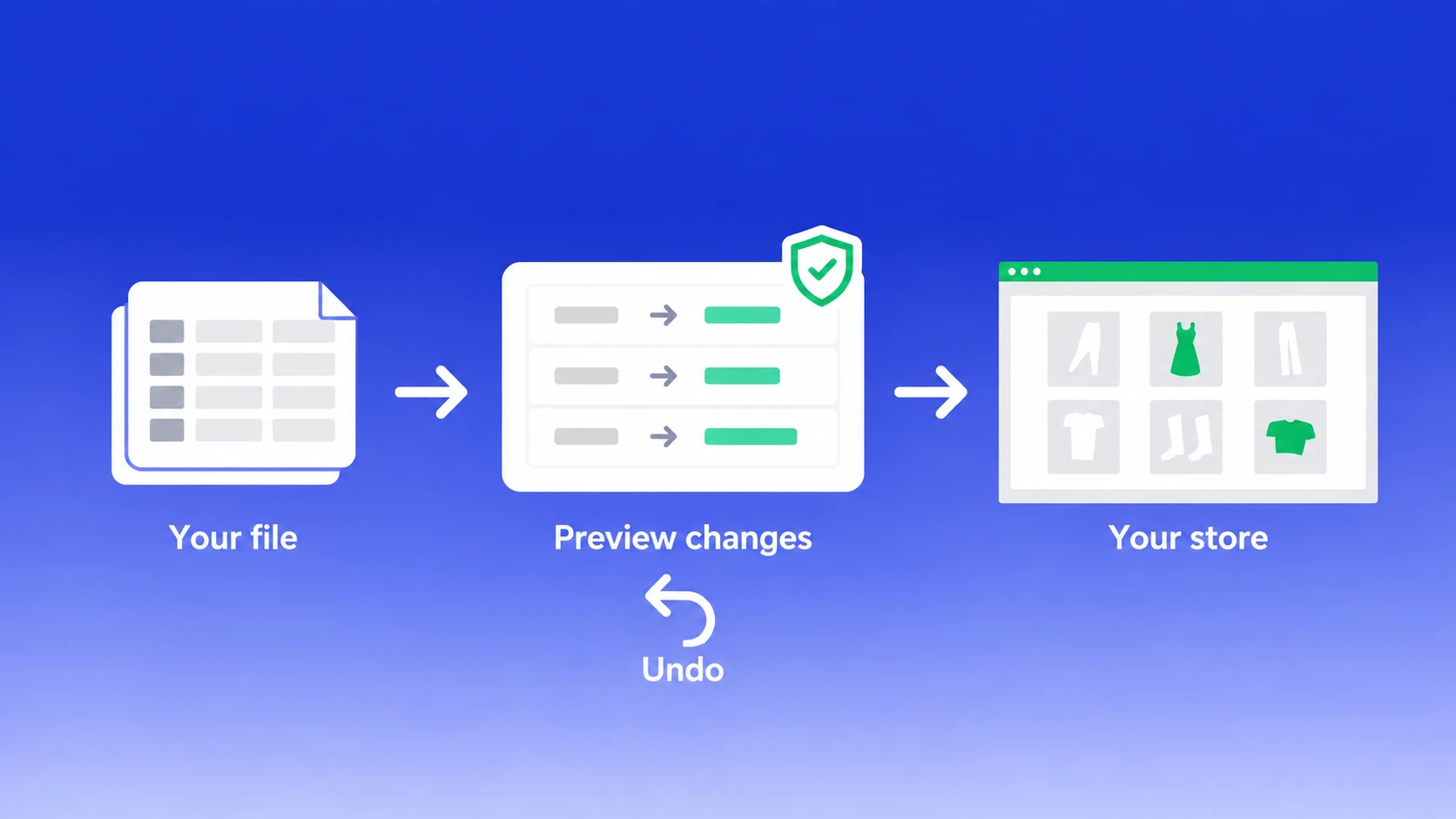
Your storefront shouldn’t be where you find the mistake.
An import without a change preview or saved old values can leave a merchant discovering mistakes on the storefront.
BluePeacock shows the changes first and saves the previous values before writing, so a bad import has a way back.
Four steps. You make the call.
BluePeacock imports store data from CSV or Excel after you review and confirm the exact changes.
Upload your file
Choose a CSV or Excel file and map its fields. No reformatting for supported exports.
See what will change
Review every row and every change before anything is written to Shopify.
Confirm the import
Old values are saved before the write. You get a finished result when the import completes.
Undo afterward
If the import was a mistake, restore the previous values in one click.
Before, during, and after.
Your data has a way back.
BluePeacock keeps a snapshot of every value it changes, so a finished import can be undone in one click.
See every changed row
Review every row and value before anything is written to your store. You decide whether to go ahead.
Keep the previous value
BluePeacock saves the old value of every field it changes. The snapshot happens before the write.
Undo the import
Restore the previous values in one click if a finished import was a mistake.
No record identity? The row is refused and named. Every refused row tells you the row, column, and what to fix.
Keep what is already in your store.
A blank cell leaves that field unchanged. BluePeacock never treats it as an instruction to clear a value.
The same file makes no extra changes.
Re-running the same file does nothing the second time. Your store data stays as it was after the first import.
BluePeacock is here.
Talk to us.
BluePeacock responds by email and phone the same working day, on every plan including free. You speak directly with a person, with no support bot in the way.
Pricing
Choose the plan that best fits your business.
All listed data types are supported. Prices and file allowances are planned; billing, larger-file handling, export and the workflows marked coming are not available yet.
Free
Features
- Per file (planned limits):
- 50 products, 20 collections
- 20 customers, 20 companies
- 20 discounts, 20 translations
- 20 orders & draft orders, 20 payouts
- 20 pages, 20 blog posts
- 20 redirects, 4 menus, 20 activity records
- 20 files, 20 metaobjects, ∞ metafields
- 20 metafield definitions, 20 locations
- Linked variants, catalogues & metaobject definitions (allowances to be announced)
- CSV/Excel imports with field mapping
- CSV/Excel exports, filtering, file URL importsComing
- Unlimited manual imports & exportsComing
- Standard transformations, parallel processing, 2 simultaneous jobsComing
- WooCommerce product migrationComing
- MCP reference materialsComing
Basic
Features
- Per file (planned limits):
- 10K products, 600 collections
- 4K customers, 100 companies
- 600 discounts, 20K translations
- 2K orders & draft orders, 732 payouts
- 100 pages, 100 blog posts
- 20K redirects, ∞ menus, 20K activity records
- 20K files, 100 metaobjects, ∞ metafields
- 200 metafield definitions, 200 locations
- Linked variants, catalogues & metaobject definitions (allowances to be announced)
- CSV/Excel imports with field mapping
- CSV/Excel exports, filtering, file URL importsComing
- Unlimited manual imports & exportsComing
- Standard & custom transformations, parallel processing, 8 simultaneous jobsComing
- FTP/SFTP, WebDAV, Google Sheets & DriveComing
- Scheduled imports & exportsComing
- WooCommerce API, Etsy migration & store copyingComing
- Custom CSV, fulfilment, accounting & Google Shopping exportsComing
- Full MCP server access & CLIComing
Pro
Features
- Per file (planned limits):
- 100K products, 6K collections
- 40K customers, 1K companies
- 6K discounts, 200K translations
- 20K orders & draft orders, 7,320 payouts
- 1K pages, 1K blog posts
- 200K redirects, ∞ menus, 200K activity records
- 200K files, 1K metaobjects, ∞ metafields
- 1K metafield definitions, 1K locations
- Linked variants, catalogues & metaobject definitions (allowances to be announced)
- CSV/Excel imports with field mapping
- CSV/Excel exports, filtering, file URL importsComing
- Unlimited manual imports & exportsComing
- Standard & custom transformations, parallel processing, 8 simultaneous jobsComing
- FTP/SFTP, WebDAV, Google Sheets & DriveComing
- Scheduled imports & exportsComing
- WooCommerce API, Etsy migration & store copyingComing
- Custom CSV, fulfilment, accounting & Google Shopping exportsComing
- Full MCP server access & CLIComing
Enterprise
Features
- Per file (planned limits):
- Unlimited products, collections, customers & companies
- Unlimited orders, draft orders, payouts & discounts
- Unlimited pages, blogs, translations & redirects
- Unlimited files, menus, activity & locations
- Unlimited metafields, metaobjects & metafield definitions
- Linked variants, catalogues & metaobject definitions (allowances to be announced)
- CSV/Excel imports with field mapping
- CSV/Excel exports, filtering, file URL importsComing
- Unlimited manual imports & exportsComing
- Standard & custom transformations, parallel processing, 8 simultaneous jobsComing
- FTP/SFTP, WebDAV, Google Sheets & DriveComing
- Scheduled imports & exportsComing
- WooCommerce API, Etsy migration & store copyingComing
- Custom CSV, fulfilment, accounting & Google Shopping exportsComing
- Full MCP server access & CLIComing
- Batch imports, 20+ parallel threads per jobComing
Already built for store data imports, included across planned tiers: CSV/Excel with field mapping, every-row preview, saved old values, one-click undo, blank-cell protection, identity checks, row-level errors, safe repeat imports, no extra signup, and BluePeacock email and phone support.
All prices are in USD. Plans are not purchasable yet. Free developer access for non-paying Shopify stores is coming, with unlimited rows and 4 simultaneous jobs planned. Talk to us
Before you import.
BluePeacock imports the store data types listed in the plans. Here is how imports work and what is still coming.
Ask us a questionCan I undo a Shopify bulk import?
Yes. BluePeacock saves the previous value of every field it changes, before it writes, so a finished import can be undone in one click.
What happens if my import file has a blank cell?
The field is left alone. A blank cell is never treated as an instruction to clear a value.
Does BluePeacock work with Shopify product export files?
Yes. BluePeacock reads Shopify's own product export unchanged, for products.
Who do I contact if my import goes wrong?
BluePeacock, by email and phone, the same working day, on every plan including the free one. There is no support bot.
Does BluePeacock export data yet?
Not yet. Store data imports are live; export is on the roadmap.
What Shopify data can BluePeacock import?
BluePeacock imports all data types listed in the plans: products, linked variants, collections, customers, B2B companies, orders, draft orders, payouts, discounts, translations, pages, blog posts, redirects, navigation menus, activity records, files, metaobjects, metaobject definitions, metafields, metafield definitions, locations, and catalogues.
Which files can I upload?
CSV and Excel files for the supported store data types. Map the fields, then review the changes before confirming the import. Shopify product export files can be read without reformatting.
What if a row has no record identity?
BluePeacock refuses the row and names it instead of guessing and creating a duplicate. Every refused row identifies the row, the column, and what to fix.
What happens if I import the same file twice?
Re-running the same file makes no further changes the second time.
Does BluePeacock run imports in the background?
No. Upload, map, preview, and confirm run as one synchronous flow. The app shows a finished result, not live job progress. Background jobs, scheduling, and supplier feeds are not available yet.
Do I need to fill out another signup form?
No. BluePeacock does not collect a phone number, address, or other personal data beyond the Shopify install.
Can I install it from the Shopify App Store?
Not yet. BluePeacock Bulk Import Export is not published on the Shopify App Store. Contact BluePeacock to ask about access. Paid billing is not available yet; the prices on this page are planned.
See the change. Keep the old value.
Talk to BluePeacock about importing your store data.